Context.
Users need reminder notifications that keep them informed about pending tasks.
Enabling this feature sends reminder notifications for pending tasks, with the aim of facilitating timely tracking of their operations and preventing delays.
Steps to enable reminders in Focaltec Control de gastos.
Please submit a support ticket or send an email to soporte@focaltec.com or ayuda@focaltec.com with the subject line “Enable reminders in CDG” to request that support perform the configuration.
Support will need to verify that the option is enabled and configured under Accounts: “Company > Settings > Pending Reminders”.
Please include the following information in the ticket so that Support can set up the reminders:
Entities to be notified (Refers to the status of the Advance payment - Expense report or Refund), when the user has an activity under this status:
* Advances pending submission for approval.
* Advances pending approval.
* Advances pending review by accounting.
* Advances pending payment.
* Advances pending refund.
* Advances pending verification.
* Reports pending submission for approval.
* Reports pending approval.
* Reports pending review by accounting.
* Reports pending payment.
* Reports pending return.
* Returns pending submission for approval.
* Returns pending verification.
Days for sending reminders: Select the days of the week (Monday through Sunday) on which reminders will be sent; reminders are sent at 12:00 a.m.
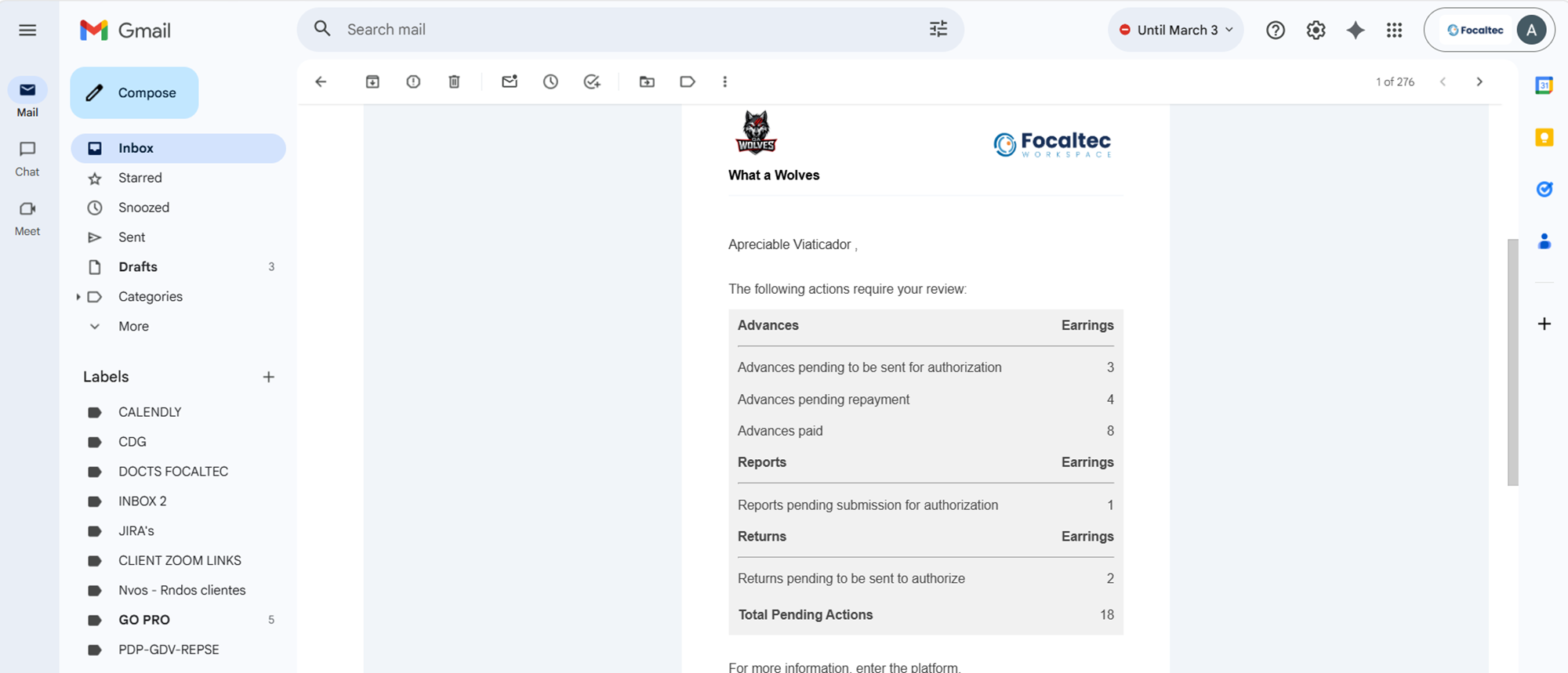
Once it is confirmed that the settings have been configured within the Focaltec Control de gastos portal, users (depending on their role) will receive emails detailing the tasks they still need to complete.
Example of the email the user receives: